Zebra ZD410 vs ZD420 vs ZD620: Which Label Printer Do You Need?
Zebra's ZD-series desktop printers are some of the most common label printers you'll find in retail counters, healthcare facilities, and warehouses — but the model numbers can be confusing at a glance. The ZD410, ZD420, and ZD620 all look similar and share the same general "compact desktop printer" category, yet they're built for very different jobs. Here's how to tell them apart and figure out which one actually fits your use case.
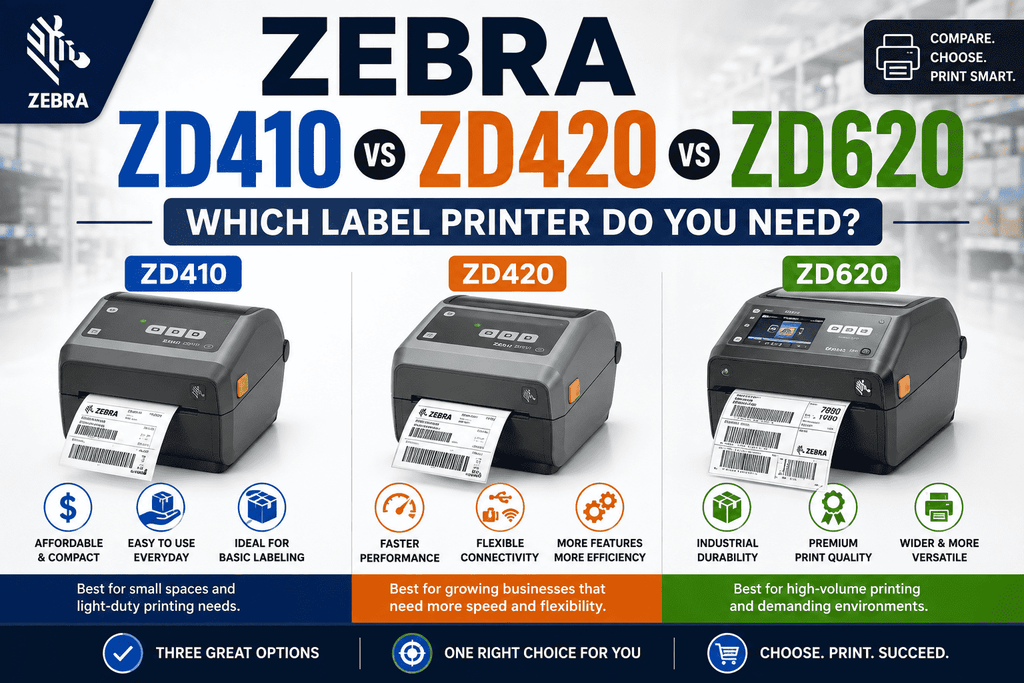
The Short Answer
- ZD410 – The smallest and most affordable option. 2-inch, direct thermal only. Best for small labels, wristbands, and tight spaces.
- ZD420 – The 4-inch mid-tier printer. Available in direct thermal or thermal transfer (including a unique ribbon cartridge version). Best for general-purpose label printing.
- ZD620 – The premium 4-inch printer. Same footprint as the ZD420 but with more standard features, faster performance, and greater configurability. Best for higher-volume or more demanding printing environments.
Zebra ZD410: Compact and Budget-Friendly
The ZD410 is Zebra's most compact desktop printer and the immediate successor to the enduring LP2824 Plus. It is a 2-inch direct thermal desktop printer with dimensions of around 6 inches in height, 4.5 inches in width, and 8.6 inches in depth, weighing merely 2.2 pounds, making it compact enough to accommodate a congested counter or shelf.
Key characteristics:
- Direct thermal only — no thermal transfer/ribbon option, so it can't print on synthetic or long-life labels that require ribbon.
- The utmost print width is 2.2 inches, featuring print resolution alternatives of 203 dpi or 300 dpi, with print velocities reaching 6 inches per second.
- Connectivity alternatives comprise USB, USB Host, Bluetooth Low Energy, and an optional Ethernet module, facilitating simultaneous Wi-Fi and Ethernet capability.
- A portable media sensor accommodates off-center black marks, die-cut notches, or various labels along its width advantageous for jewelry tags, shelf labels, and minor barcode tasks.
Best for: Small-format labels — jewelry tags, specimen labels, wristbands, name badges, small shelf tags — where the label's lifespan doesn't require ribbon-based durability, and where desk space is at a premium.
Zebra ZD420: The Flexible Mid-Range Workhorse
The ZD420 steps up to a full 4-inch print width and offers something the ZD410 doesn't: thermal transfer printing. This means it can print with ribbon for labels that need to resist fading, moisture, chemicals, or abrasion over time — not just direct thermal labels that darken with heat and no ribbon involved.
Key characteristics:
- Offered in both a direct thermal variant and a thermal transfer variant — with a unique Thermal Transfer Ribbon Cartridge edition.
- The ribbon cartridge model is exclusive to the ZD420 series and streamlines the ribbon loading process by utilizing a single cartridge instead of a conventional ribbon roll. This cartridge can only be inserted in one direction, rendering it almost error-proof, and it features a chip that monitors the remaining ribbon lifespan.
- Up to 8 inches per second at 203 dpi or 6 inches per second at 300 dpi, which is the fastest print speed in its class.
- Same general connectivity suite as the ZD410 and ZD620 — USB, serial, Ethernet, Wi-Fi, and Bluetooth — with modular, field-installable connectivity options.
- Available in a healthcare (HC) variant with disinfectant-ready plastics for clinical environments.
Best for: General-purpose label printing where you need standard 4-inch labels and want the flexibility to choose between direct thermal and thermal transfer — especially if you like the convenience of the ribbon cartridge for frequent ribbon changes.
Zebra ZD620: The Premium Performer
The ZD620 shares the same 4-inch footprint and general shape as the ZD420, but it's positioned as the higher-end option in the lineup, with more standard features included out of the box rather than as add-ons.
Key characteristics:
- It takes the place of Zebra's older GX Series and ZD500 printers and has better print quality and more advanced features as standard than the ZD420.
- It comes in both direct thermal and thermal transfer models and has more standard features than any other Zebra desktop printer at the time it was released. For example, you can add an optional color LCD and a 10-button interface to make setup and status checking easier.
- Supports a dual-capacity ribbon roll configuration that the ZD420 does not. This is useful for thermal transfer printing large amounts of material that needs fewer ribbon changes.
- Shares the same print speed ceiling as the ZD420 (up to 8 ips at 203 dpi / 6 ips at 300 dpi), but its more robust internals and additional standard features make it better suited to sustained, higher-duty-cycle use.
- Also available in a healthcare (HC) variant.
Note: The ZD620 is no longer being made and has been replaced by the ZD621. If you're looking to buy something new, you may only be able to find ZD620 units that are still in stock or that have been refurbished or used. The ZD621 is now the equal for new purchases.
Best for: Environments with higher print volumes, more demanding label requirements, or where the extra standard features (like the color LCD interface or dual-capacity ribbon) justify the step up from the ZD420.
Side-by-Side Comparison
| Feature | ZD410 | ZD420 | ZD620 |
|---|---|---|---|
| Print width | 2 inches | 4 inches | 4 inches |
| Print method | Direct thermal only | Direct thermal or thermal transfer (incl. ribbon cartridge option) | Direct thermal or thermal transfer (incl. dual-capacity ribbon) |
| Max print speed | Up to 6 ips | Up to 8 ips (203 dpi) | Up to 8 ips (203 dpi) |
| Resolution options | 203 / 300 dpi | 203 / 300 dpi | 203 / 300 dpi |
| Interface | 3-button, 5 LED icons | 3-button, 5 LED icons | Optional color LCD, 10-button interface |
| Connectivity | USB, USB Host, BTLE, optional Ethernet/Wi-Fi | USB, serial, Ethernet, Wi-Fi, Bluetooth (modular) | USB, serial, Ethernet, Wi-Fi, Bluetooth (modular) |
| Healthcare (HC) version | Yes | Yes | Yes |
| Product status | Current | Current | End of life — replaced by ZD621 |
Which One Should You Buy?
- Printing small labels, wristbands, or tags in a tight space, and don't need ribbon-based durability? Go with the ZD410.
- Need standard 4-inch labels with the flexibility of direct thermal or thermal transfer, and want an easy-loading ribbon option? The ZD420 is the practical, well-rounded choice for most businesses.
- Running higher print volumes, need more standard features, or want the dual-capacity ribbon option for thermal transfer? Look at the ZD620 — though keep in mind it's end-of-life, so its direct successor, the ZD621, is worth considering for new purchases.
A Quick Note on Buying
If you're comparing used or refurbished units, double-check whether you're getting a direct thermal or thermal transfer model, since the print mechanisms aren't interchangeable after the fact. Also confirm which connectivity modules are installed — Ethernet, Wi-Fi, and serial options are often modular and sold separately on these printers.
Still not sure which model fits your workflow? Reach out to our team at Beaver Computers, we can help match the right Zebra printer to your label size, volume, and durability needs.
BUY THESE PRINTERS