SAS vs SATA Drives: Which Storage Is Better for Servers?
One of the most important things to think about when building or upgrading a server is picking the right storage drive. Storage has an impact on how reliable, fast, scalable, and expensive system upkeep is over time.
SAS (Serial Attached SCSI) and SATA (Serial ATA) drives are two common types of storage used in servers. Both can store a lot of data and use spinning hard disk technology, but they are made to handle different amounts of work.
A lot of people use SATA drives for cheap, high-capacity storage, while SAS drives are made for demanding business settings where speed and dependability are very important.
With this guide, we'll show you the differences between SAS and SATA drives and help you pick the best one for your computer.
What Is a SAS Drive?
SAS stands for Serial Attached SCSI. SAS drives are enterprise-grade storage devices designed for servers, data centers, and professional storage environments.
They are built to handle:
- 24/7 operation
- Heavy read/write workloads
- Multiple users accessing data simultaneously
- RAID storage environments
- Business-critical applications
SAS drives are commonly found in:
- Dell PowerEdge servers
- HPE ProLiant servers
- IBM/Lenovo servers
- Enterprise storage arrays
Popular SAS drive examples include:
- Seagate Enterprise SAS HDDs
- Dell SAS server hard drives
- HGST Ultrastar SAS drives
- HPE SAS drives
What Is a SATA Drive?
SATA stands for Serial ATA. SATA drives are widely used because they provide large storage capacity at a lower cost.
They are commonly used in:
- Desktop computers
- Entry-level servers
- Backup storage systems
- Home NAS devices
- File storage solutions
SATA drives are available in large capacities, making them a popular choice when storage space is more important than maximum performance.
SAS vs SATA: Key Differences
1. Performance
The biggest difference between SAS and SATA drives is performance.
SAS SSDs are engineered for settings where numerous users and applications concurrently access data. They often offer superior input/output efficiency and reduced latency.
SATA drives prioritize storage capacity and economical efficiency. They are effective for retaining substantial data volumes, however their performance may diminish under intense server demands.
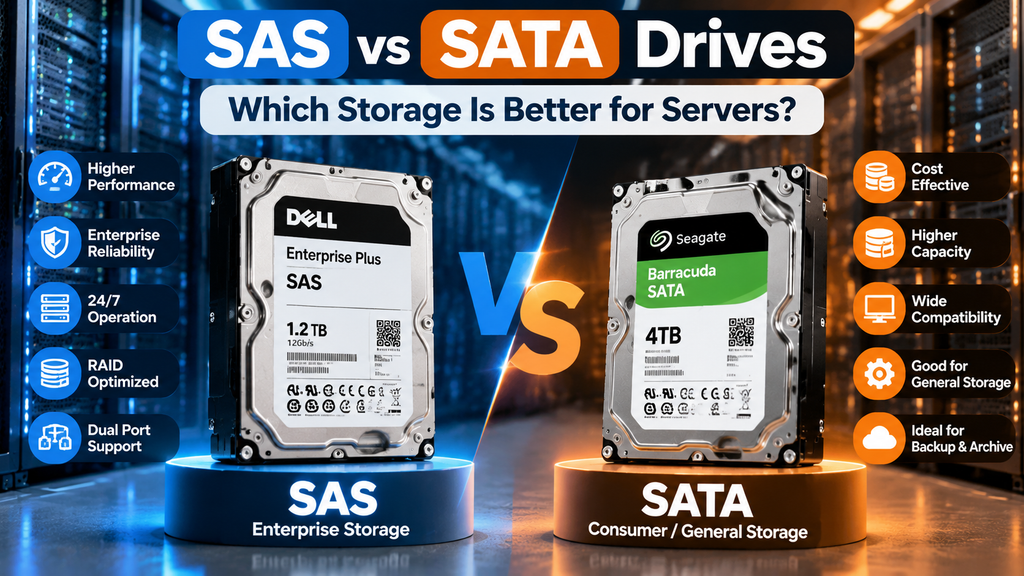
SAS Advantages:
- Higher IOPS performance
- Faster data access
- Better multi-user workload handling
- Designed for enterprise applications
SATA Advantages:
- Good sequential read/write performance
- Higher capacity options
- Lower cost per TB
2. Reliability and Workload Rating
Servers often operate continuously for years. Storage failure can cause downtime and data loss.
SAS drives are built for enterprise workloads and typically have:
- Higher workload ratings
- Better error handling
- More durable components
- Longer service life
SATA drives can be reliable, but standard consumer SATA models are not designed for the same level of continuous server operation.
3. 24/7 Operation
Enterprise servers usually run without interruption.
SAS drives are designed specifically for always-on environments, including:
- Data centers
- Cloud infrastructure
- Business applications
- Virtual machines
Many SATA drives are designed for lighter workloads and may not be ideal for intensive server applications.
4. Interface Differences
SAS and SATA drives use different interfaces.
| Feature | SAS | SATA |
|---|---|---|
| Interface | Serial Attached SCSI | Serial ATA |
| Designed For | Enterprise servers | Consumer and entry-level systems |
| Data Transfer | Higher performance | Standard performance |
| Dual Port Support | Yes | No |
| RAID Support | Excellent | Good |
| Cost | Higher | Lower |
One major advantage of SAS is dual-port capability. SAS drives can connect through two separate paths, improving availability in enterprise storage systems.
5. RAID Compatibility
RAID is commonly used in servers to improve performance and protect data.
SAS drives are optimized for RAID environments because they provide:
- Better error recovery
- Improved command handling
- Enterprise firmware
- Higher reliability under RAID workloads
SATA drives can also work with RAID controllers, but enterprise SAS drives are usually preferred for mission-critical systems.
6. Capacity and Cost
SATA drives usually provide more storage capacity for the money.
For example:
A company needing several terabytes of backup storage may choose SATA because it offers lower cost per TB.
A company running databases, ERP systems, or virtualization platforms may choose SAS because performance and reliability matter more.
SAS vs SATA Drive Comparison
| Feature | SAS Drive | SATA Drive |
|---|---|---|
| Primary Use | Enterprise servers | General storage |
| Performance | Higher | Moderate |
| Reliability | Very high | Standard to high |
| 24/7 Operation | Designed for it | Depends on model |
| RAID Support | Excellent | Good |
| Price | More expensive | Budget-friendly |
| Capacity Cost | Higher cost per TB | Lower cost per TB |
When Should You Choose SAS Drives?
SAS drives are recommended for:
- Database servers
- Virtualization servers
- Enterprise applications
- Financial systems
- High-traffic websites
- Business-critical storage
- Large RAID arrays
If downtime is expensive, SAS storage provides the reliability and performance needed for demanding environments.
When Should You Choose SATA Drives?
SATA drives are a good choice for:
- Backup servers
- Archive storage
- Media storage
- File servers
- Cost-focused storage solutions
Businesses that need large amounts of storage without heavy daily transactions can benefit from SATA drives.
Can You Use SATA Drives in a SAS Server?
Yes, many SAS controllers support SATA drives.
However, the reverse is not possible:
- SAS drives require a SAS controller.
- SATA controllers cannot operate SAS drives.
Before purchasing a replacement drive, always confirm your server model, RAID controller compatibility, drive interface, and firmware requirements.
SAS SSD vs SATA SSD
The SAS vs SATA comparison also applies to solid-state drives.
Enterprise SAS SSDs offer:
- Higher reliability
- Better endurance
- Dual-port support
- Enterprise workload optimization
SATA SSDs offer:
- Lower cost
- Good performance
- Wide compatibility
For demanding server applications, SAS SSDs are often preferred.
Where Can You Buy SAS Drives in Canada?
Companies that need reliable server storage need to work with a supplier that knows what enterprise hardware needs are.
Beaver Computers offers business storage options in Canada, such as SAS hard drives, replacement HDDs for servers, and storage parts for offices.
Choosing the right storage technology can help your server be more reliable and run faster, whether you need a Dell SAS hard drive, an HPE server storage upgrade, or an enterprise replacement drive.
Final Thoughts
There is no definitive victor between SAS and SATA drives. The appropriate selection is contingent upon your server specifications.
Opt for SAS drives when you require optimal dependability, superior performance, and enterprise-grade functionality.
Select SATA disks when seeking economical, high-capacity storage solutions for backups, archives, or less intensive tasks.
Comprehending your workload, financial constraints, and performance criteria will assist you in choosing the optimal storage solution for your server ecosystem.