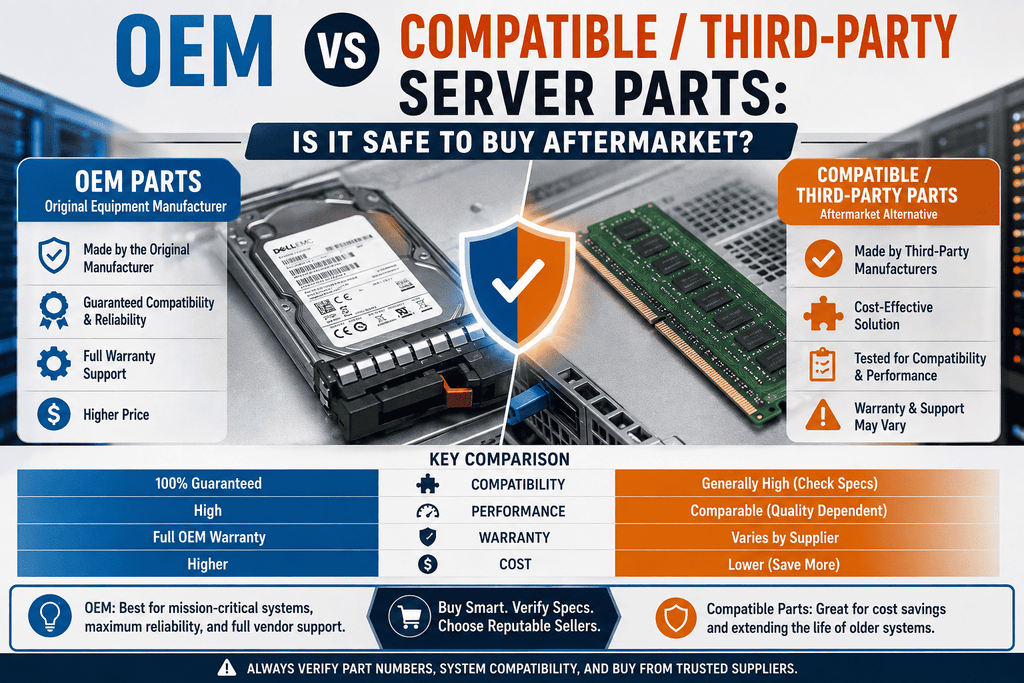
OEM vs Compatible/Third-Party Server Parts: Is It Safe to Buy Aftermarket?
If you have ever evaluated the cost of a replacement transceiver, RAID battery, or memory module from the original manufacturer, you may have experienced significant price shock and subsequently questioned the safety of utilizing a "compatible" or "third-party" alternative at a reduced price in a production environment. This inquiry is prevalent among IT purchasers and warrants a clear response: indeed, aftermarket server components can be equally safe and dependable as OEM products, provided they are sourced from a trustworthy supplier that conducts thorough testing of their offerings. Here’s what distinguishes reliable aftermarket components from those that should be eschewed.
What "OEM" and "Compatible" Actually Mean
OEM parts are sold under the same brand name as your server or switch. For example, a hard drive with the Dell brand, a transceiver with the HPE brand, and a DAC cable with the Cisco brand are all OEM parts. You are paying for the manufacturer's special packing, firmware testing, and customer service.
Compatible (third-party/aftermarket) parts are functionally identical parts that are sold without the OEM's name and support umbrella. They are often made on the same production lines or by other qualified manufacturers. Most of the time, the gear inside is the same or very similar to what comes in the OEM box. The only things that are different are the price, the label, and the company that stands behind it.
Most buyers don't realize how important this difference is: "compatible" doesn't mean "generic" or "lesser." It means the part meets the same performance, signaling, and interface requirements as the OEM equivalent, but was checked by a third party instead of the original brand.
Compatible parts, also called third-party or aftermarket parts, are exactly the same as OEM parts but are sold without the OEM's name and support umbrella. Most of the time, they are made on the same lines or by other qualified manufacturers. These days, the gear inside is the same or very close to what comes in the OEM box. The only things that are different are the brand, the price, and the company that sells it.
You might not know this, but "compatible" does not mean "generic" or "lesser." It means that the part works as well and has the same signaling and interface requirements as the OEM version. However, it wasn't the OEM that checked it; instead, it was a third party.
Why Aftermarket Parts Cost Less (Without Cutting Corners)
The price gap between OEM and compatible parts isn't primarily a quality gap — it's a business-model gap. OEM pricing bakes in:
- Brand premium and marketing costs
- Proprietary firmware locks that restrict a part to "approved" hardware
- Exclusive distribution and support contracts
- R&D costs amortized across a narrower customer base
Reliable suppliers of compatible parts take off those extra layers while keeping the quality of the making underneath. In this way, a transmitter or memory module made by a third party can sell for 40–70% less than the same product made by the original equipment manufacturer (OEM).
Where Aftermarket Parts Are Generally a Safe, Smart Buy
- Transceivers and DAC/AOC cables: Most third-party optics are made to the same MSA (Multi-Source Agreement) standards as OEM optics, and trustworthy sellers will program them to work with your switch platform.
- Memory (RAM) modules: DDR standards are clear, and a lot of different brands make suitable RAM. This makes it one of the least risky types of aftermarket products.
- Batteries and supercap backup units: A quality compatible battery will function identically as long as the physical connector, voltage, and capacity correspond to the OEM specification.
- Cables, mounting hardware, and rails: for simple machines where "compatible" basically means "identical"."
- Power supplies (PSUs): bought from a store that checks for the right wattage, connector pinout, and efficiency rating.
Where You Should Be More Cautious
Aftermarket isn't a blanket "always safe" answer — a few categories deserve extra scrutiny:
- Firmware-locked components: RAID controllers and drives are intentionally locked by certain manufacturers to prevent the acceptance of non-OEM firmware signatures. In these instances, "compatible" components may necessitate a firmware workaround, and it is imperative that you verify that this is adequately addressed prior to making a purchase.
- Safety-critical power components: in which corner-cutting genuinely manifests as a fire or failure risk is cheap, unbranded PSUs from unverified sellers. This is a supplier-vetting issue, not an argument against aftermarket parts in general.
- Warranty-sensitive equipment still under OEM coverage installing a non-OEM component in a server that is still under active manufacturer warranty may result in the cancelation of coverage for the entire system, contingent upon the vendor's policy. Prior to proceeding, verify the terms of your warranty.
How to Tell If an Aftermarket Supplier Is Trustworthy
Not all "compatible" listings are created equal. Before buying, look for:
- Explicit compatibility testing: seller should be clear about which models of server, switch, or controller the part works with, not just saying "universal compatibility."
- A real warranty on the part itself: supplier who is confident in their product provides a substantial warranty period, regardless of whether the OEM warranty on your system is still active.
- Transparency about manufacturing origin: providers with a good reputation don't hide behind vague terms like "premium compatible" when they talk about where and how parts are made.
- A return/replacement policy that doesn't punish you for a DOA part: upon arrival are not negligible for any hardware, whether from an OEM or otherwise; the critical factor is the supplier's facilitation of obtaining a functional replacement.
- Track record and reviews from IT buyers, not just marketplace star ratings: Look for evidence the supplier has shipped into production environments similar to yours.
OEM vs Compatible: A Practical Framework
| Situation | Recommendation |
|---|---|
| System still under active OEM warranty | Check warranty terms before installing aftermarket; may need OEM part to preserve coverage |
| Mission-critical production system, no warranty concern | Compatible parts from a vetted supplier are generally safe and cost-effective |
| Budget-constrained refresh or lab/test environment | Aftermarket is usually the clear choice |
| Firmware-locked component (some drives, controllers) | Confirm the supplier handles compatibility/firmware correctly before buying |
| High power-delivery components (PSUs) from an unknown seller | Extra scrutiny warranted — stick to suppliers with documented testing |
| Standard components: RAM, cables, transceivers, batteries | Aftermarket from a reputable supplier is typically as reliable as OEM |
The Bottom Line
The Real Question is not "OEM versus aftermarket" in general terms — rather, it is "OEM versus a particular supplier's aftermarket component. An inexpensive, unverified component from an unidentified marketplace listing poses genuine hazards. A compatible component from a vendor that rigorously evaluates against your specific hardware, offers a legitimate guarantee, and is open about its sourcing is, in numerous categories, functionally equivalent to the OEM version — at a significantly reduced price.
The most secure strategy mirrors the method employed by seasoned IT purchasers for all acquisitions, whether OEM or not: understand the product, identify the vendor, and select a provider prepared to support their offerings.