How to Tell If Your RAID Controller Battery Is Failing (symptoms, warning lights, BIOS errors)
failing RAID controller battery rarely announces itself with a dramatic crash. Instead, it shows up as a handful of small, easy-to-miss signals — a change in cache behavior, a status LED that isn't quite the color it should be, an error buried in a log file — until the day the power blips and you find out the hard way. Here's how to catch a failing RAID battery early, before it costs you cached data.
Why This Matters More Than It Seems
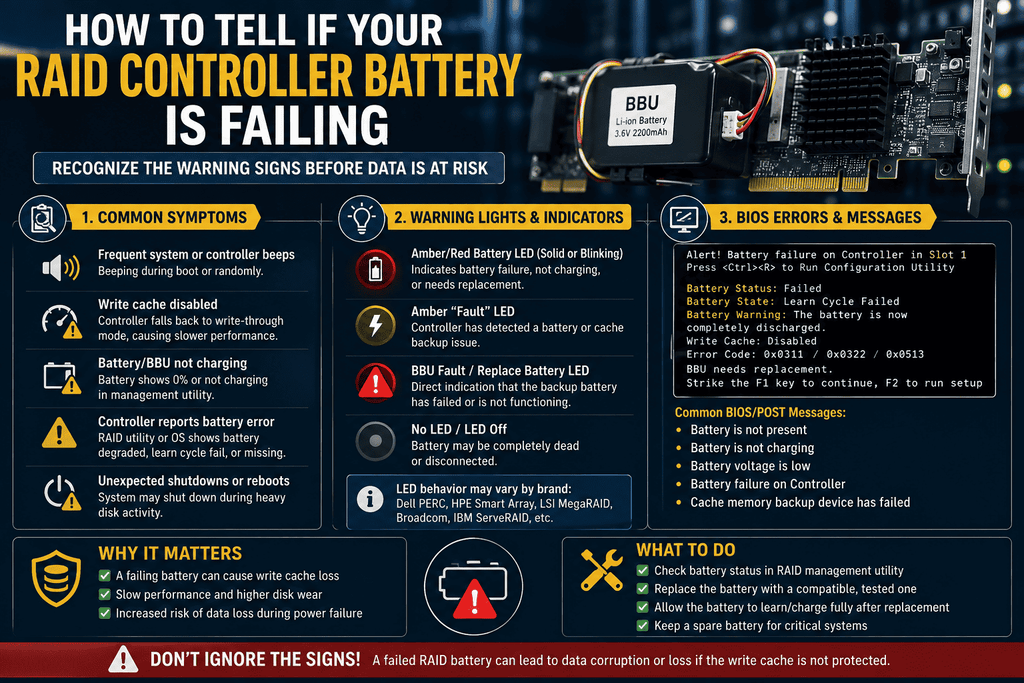
backup unit (BBU) or supercapacitor is what RAID controllers with write-back cache use to keep data in volatile cache memory safe when the power goes out. A warning message or alert on the screen or in the logs, a flashing or red LED on the RAID controller or battery module, a smaller cache size or stopped write-back mode, slow or erratic RAID performance, and data that isn't consistent or is corrupt are all common signs of a battery that is dying. If you catch these early, it will mean the difference between a normal parts swap and a real data loss event.
Warning Sign #1: LED Status Changes
on most RAID controllers and battery packs lets you quickly see how healthy the battery is. A warning light that's on can mean that the battery is low on power or has failed. Many RAID systems use LED lights to show the health of components, and if a light that usually means everything is fine changes color to red or amber, that's a strong sign that the battery is broken.
What to check: Don't just look at the front panel; if your server chassis lets you, find the battery/cache status LED on the controller itself. Some diagnostic LEDs can only be seen from inside the case.
Warning Sign #2: BIOS/POST Error Messages
More generally within RAID platforms, a malfunctioning RAID controller battery can result in the loss of configuration after a power incident, while controller-level problems may trigger BIOS or utility errors related to lost configurations or defective adapters, or in critical situations, an outright failure to access the controller's setup utility.
Observe the POST screens while rebooting and refrain from ignoring unknown error texts; any rapidly appearing message should be noted and researched.
Warning Sign #3: Cache Mode Silently Switching to Write-Through
When a controller identifies a battery issue, it typically safeguards itself (and your information) by deactivating write-back caching and reverting to write-through mode, as write-back cache is only secure when the battery can ensure its integrity after a power failure. A diminished cache size or deactivated write-back option serves as a prominent sign of a deteriorating battery.
Examine the following: Should there be a significant decline in array write performance without any apparent cause (no additional workload, no alterations in hardware), investigate your RAID management utility for the existing cache policy prior to concluding it is an issue with the disk or controller.
Warning Sign #4: Slow or Erratic RAID Performance
Lackluster or inconsistent RAID performance, along with data irregularities or corruption, are typical signs that a battery need maintenance. Recurrent error notifications during RAID functionality suggest that the system is facing difficulties in accessing storage devices, which may arise from cache or battery complications as well as from the drives themselves.
What to verify: Do not presume that inconsistent performance is solely a drive issue — first eliminate battery/cache condition, as it is a quicker assessment than individually replacing drives.
Warning Sign #5: Elevated Temperature at the Battery Module
This symptom develops gradually, although a battery module that is significantly warmer than the remainder of the card — or than it previously was — should be noted even prior to the emergence of additional symptoms.
What to check: If your server platform reports component-level temperatures via IPMI/BMC, add the battery/cache module to your routine monitoring, not only drive and CPU temps.
Warning Sign #6: Log Entries and Management Software Alerts
One can oversee battery status thru RAID controller software, the system BIOS, or operating system tools; it is advisable to do so proactively instead than awaiting noticeable signs.
Verify: Establish a routine or automated log examination for the management utility pertinent to your specific controller (e.g., StorCLI/MegaCli for LSI/Broadcom MegaRAID, or the appropriate tool for ServeRAID/Lenovo controllers) instead of depending on an individual to observe an LED alteration.
What to Do If You Spot These Signs
- Don't ignore write-through fallback. If your controller has already dropped to write-through mode, it's protecting your data — but performance will suffer until the battery is replaced.
- Check logs across every layer — controller management software, system BIOS/POST, and (on server platforms with one) the baseboard management controller or remote management module logs.
- Back up before you touch anything. Creating a backup of the data on the RAID array prior to replacing the battery is a crucial procedure, since a battery replacement on a compromised array entails certain risks if additional issues are present..
- Confirm the exact replacement part. Battery and supercap modules are tied to specific controller models and are not universally interchangeable — verify the exact part number before ordering a replacement.
- Act before a power event, not after. A failing battery is a "quiet" problem right up until a power outage turns it into a data-loss event. Treat any of the symptoms above as a same-week fix, not a someday task.
A Note on Prevention
Consistent preventive maintenance and vigilance for temperature surges and drive malfunctions are fundamental to circumventing RAID controller issues, with battery condition also being a critical element of that protocol. Typically, lithium-ion RAID batteries possess a lifespan of approximately 2–4 years; regarding their replacement as routine upkeep—rather than postponing until failure manifests—is the more dependable strategy for any array where write-back cache efficiency is significant.
Frequently Asked Questions
Can I keep running with write-through mode instead of replacing the battery? Technically yes — write-through mode is safe, just slower, since it doesn't rely on the battery to protect cached data. It's a reasonable short-term stopgap, but not a long-term fix if your workload depends on write-back performance.
Does a failing battery always cause visible symptoms? Not always immediately. Some degradation is only caught through active monitoring (log checks, scheduled battery relearn cycles) rather than a symptom you'd notice just by using the system day to day — which is why proactive checks matter.
Is a supercapacitor (CacheVault/flash-backed cache) module less likely to fail than a battery? Supercaps generally have a longer service life and avoid some of the wear mechanisms that affect lithium-ion battery packs, but they aren't immune to failure — the same monitoring principles apply.
If my battery already failed during a power outage, is my data gone? If the controller has lost its configuration due to a battery malfunction during a power interruption, merely substituting the battery will not recover the lost configuration or data - professional data recovery services may be required at that stage. This is precisely why identifying the warning signals prior to a disruption is crucial.
This article covers general RAID controller battery symptoms across common enterprise platforms. Always cross-reference exact error messages and log entries against your specific controller manufacturer's documentation for confirmed diagnosis.