How to Identify Your RAID Controller Battery (BBU) by Part Number
If your server is displaying a "BBU replacement required" or "battery pack missing" notification, you are not isolated - RAID controller batteries are consumable components, and the majority of servers operating for over three years will necessitate a replacement eventually. The challenging aspect lies not in locating a substitute battery, but in determining the specific one required. Between OEM component numbers, LSI/Broadcom model numbers, and half a dozen cross-reference numbers stamped on the same item, it's simple to order the wrong part.
This tutorial takes you exactly how to pin down your BBU part number so you get the appropriate battery the first time.
Why RAID Controller Batteries Matter
The majority of hardware RAID controllers, such as Dell PERC, HP Smart Array, LSI/Broadcom MegaRAID, and Intel RAID, utilize onboard cache memory to enhance write performance. That cache retains information briefly prior to being saved to disk – beneficial for efficiency, yet precarious if the server has a power failure before the writing process concludes.
The Battery Backup Unit is designed to address such issue. It observes the voltage levels on the controller's memory and redirects the cache's power supply to the battery pack when the voltage falls beneath a certain threshold, preserving the cached data until power is reinstated to ensure that pending writes are finalized without data loss. Certain premium LSI-based systems can safeguard cached information for up to 72 hours, contingent upon the chosen retention duration.
When the battery degrades or dies, the controller typically forces its virtual disks into Write Through mode instead of the faster Write Back mode this is a built-in safeguard: if the battery is missing or doesn't hold sufficient charge, the controller firmware flushes the cache and drops write caching until a working battery is installed. That's the performance hit most admins notice first, well before they see a hard failure alert.
Step 1: Check the Controller's Own Diagnostics First
Before you go hunting for a physical part number, ask the controller itself what it thinks is installed. Most management utilities (Dell OpenManage/PERCCLI, HP SSA/HPSSACLI, LSI/Broadcom StorCLI or MegaCLI) will report BBU health and, in many cases, the model.
For example, on Dell PERC controllers via the CLI, a BBU status query returns fields like battery voltage, current, temperature, and overall battery state, along with firmware status flags such as whether the battery pack is missing, whether replacement is required, or whether the remaining capacity is low. That "Replacement required: Yes" flag is often your first real clue that it's time to shop.
This won't always give you an exact orderable part number, but it confirms the controller family, which narrows your search significantly in Step 3.
Step 2: Physically Locate and Read the Battery Label
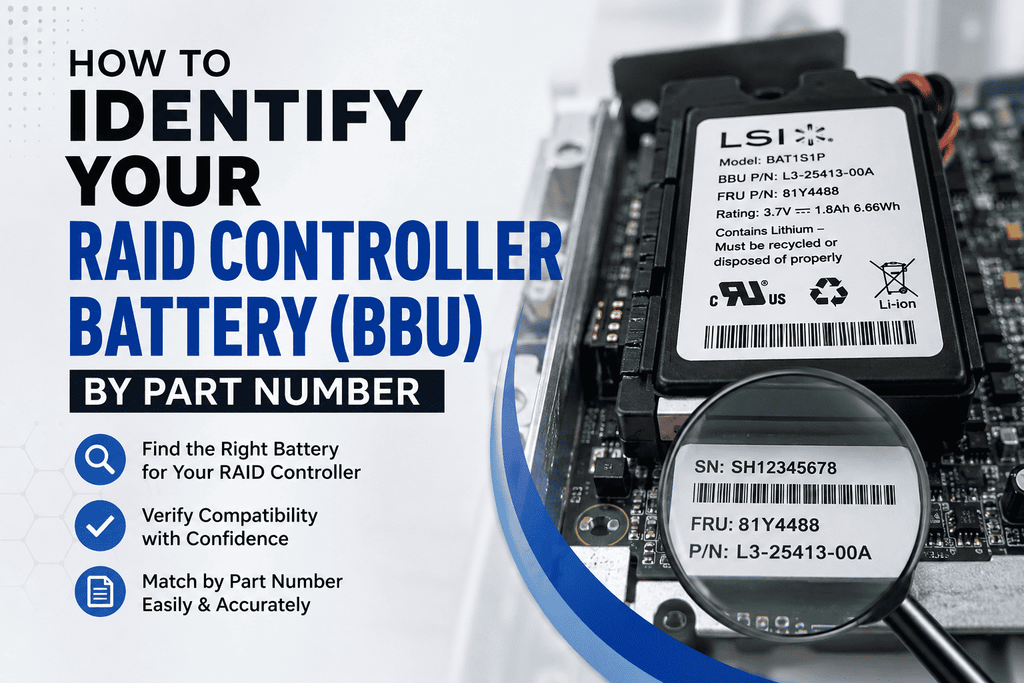
If you can safely power down and open the chassis, the fastest way to identify the exact part is to read the label directly off the battery pack or its mounting bracket/cable. Look for:
-
A manufacturer part number — often prefixed differently depending on vendor (Dell numbers are typically 5–6 characters like
H132VorNU209; LSI/Broadcom numbers often start withLSIoriBBU) - A model/series designation — e.g., "iBBU07," "iBBU08," "iBBU09," "RSBBU4"
- A barcode/SKU sticker, which sometimes differs from the printed part number but is searchable on distributor sites
- Cell chemistry and rating (e.g., Li-ion, voltage, mAh) — useful for cross-referencing compatible replacements, not for exact match
Note that some BBUs are a battery pack alone, while others (especially newer LSI/Broadcom designs) are a "supercap + battery module" combo unit — check whether your controller uses a capacitor-based backup (CacheVault) instead of a traditional battery, since those use entirely different part numbers.
Step 3: Match the Part Number to Your Controller Family
Once you have a part number (or a controller model if you couldn't get one directly), cross-reference it. Here's how identification generally breaks down by vendor:
Dell PERC Controllers
Dell reuses a handful of battery part numbers across many PERC generations, so matching your exact controller model matters more than the battery number alone:
- PERC 5/i, 6/i, H700 often use part numbers such as U8735, NU209, XJ547, P9110, and UF302, along with various related "0-prefixed" Dell equivalents. These are also cross-referenced under numbers like FR463 and DX481 depending on the source.
- PERC H710, H710P, H730, H730P, H830 Typically employs a compact battery, commonly identified as HD8WG (also described as 70K80 or T40JJ) or H132V, a 3.7V lithium-ion unit rated at approximately 1.6Wh.
Because Dell reuses the same physical battery across multiple controller generations, always confirm compatibility against your specific PERC model rather than assuming part numbers are unique to one controller.
LSI / Broadcom MegaRAID Controllers
LSI (now Broadcom) BBUs are usually labeled directly with an "iBBU" or "LSIIBBU" designation tied to specific controller series:
- iBBU07 / LSIIBBU07 Engineered for SAS 8880EM2, 9260, 9261, and 9280 series MegaRAID controllers, constructed with a 700mAh lithium-ion battery.
- iBBU08 (BAT1S1P) the preceding-generation module for the 9260/9261/9280 controller series.
- iBBU09 (BAT1S1P-A) The subsequent unit for advanced controllers encompassing the 9265, 9266, 9270, 9271, 9285, and 9286 series, together with their OEM counterparts on select IBM/Fujitsu cards.
If your label just says "BAT1S1P" with no suffix, treat it as an iBBU08-class part; a "-A" suffix indicates the iBBU09-class unit — this distinction alone determines which controller generation it fits.
Intel RAID Controllers
Intel's RAID Smart Battery Backup series employs unique part numbers prefixed with AXXRSBBU. These devices oversee DRAM voltage on the Intel RAID controller and redirect cache power to the battery pack when voltage falls beneath a specified threshold, resuming standard functionality upon the return of AC power. Ensure that the precise AXXRSBBU model number (e.g., AXXRSBBU4) corresponds with your controller's documentation, as Intel controller/BBU combinations are specific to each generation..
HP / HPE Smart Array Controllers
HP/HPE batteries are usually labeled with a numeric part number (commonly seen in the 8xxxxx-series, e.g., "876850-001"). These are tied tightly to specific Smart Array/Smart Storage controller generations, so cross-check the number against HPE's QuickSpecs or parts lookup rather than assuming cross-generation compatibility.
Step 4: Cross-Reference Before You Buy
Because the same physical battery is frequently sold under multiple manufacturer numbers (OEM number, Dell/HP internal number, and the underlying LSI/Broadcom part it's built on), always cross-reference using at least two identifiers if you have them — for example, both the printed part number and the controller model. Reputable server parts suppliers list compatible controller models alongside each battery SKU; use that compatibility list to confirm the fit rather than matching on part number alone, since resellers sometimes list the same battery under a long string of equivalent numbers.
Quick Checklist Before Ordering
- Pull the BBU status/model from your RAID management CLI or GUI if available
- Physically read the label on the battery pack for the exact printed part number
- Identify your controller's exact model (not just family — e.g., "H730" not just "PERC")
- Cross-reference the part number against your specific controller model, not just the battery series
- Confirm whether your controller uses a battery pack or a supercapacitor (CacheVault) module — they are not interchangeable
- Buy from a supplier that lists compatible controller models, not just the part number
Still Not Sure Which Battery You Need?
If you've got a part number but aren't sure it matches your controller, or you're staring at a battery with no legible label at all, send us the controller model (and a photo of the battery if you have one) and our team at Beaver Computers can help confirm the correct replacement before you order.